I have developed Team Contribution Tracking (TeCTra) system for UTS. It is an Ajax web application the back-end of which is built using Java. A few months ago, a new function to get feedback from users was added to TeCTra.
TeCTra User Feedback Function
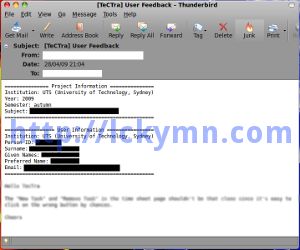
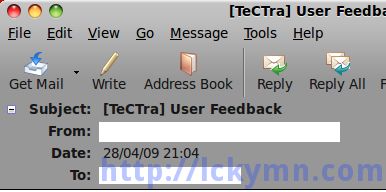
About a half month ago, I’ve got a feedback email from a user. This is sent through the function above.
TeCTra User Feedback Email
TeCTra User Feedback Email
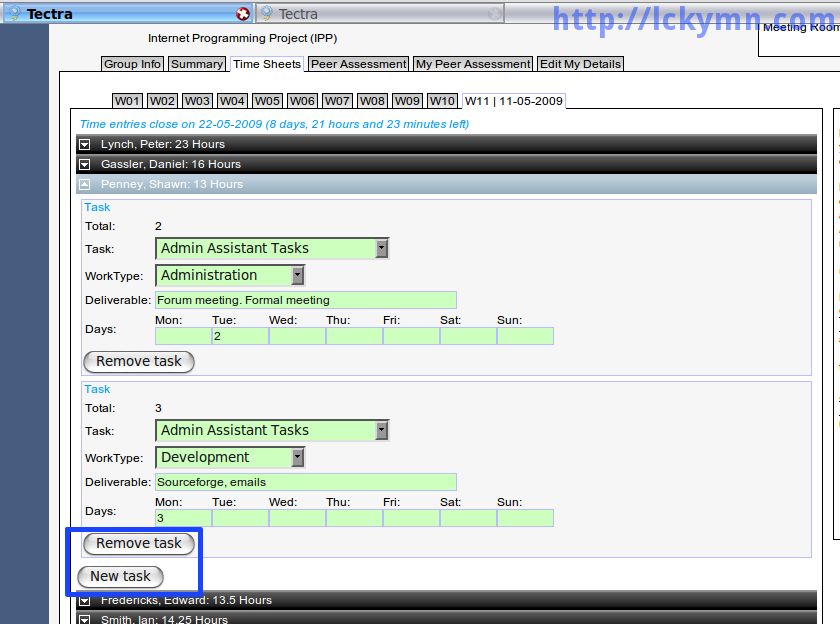
This feedback is about the usability of TeCTra. What he/she points out is that the button to create a new task in the time sheet tab is positioned too close to the remove button so users may click the remove button by mistake when they want to click the add task button.
As the image below shows, the last remove button is too close to the new task button. So as mentioned in the feedback, users might click the remove button by mistake.
The last remove task button is too close to the new task button.
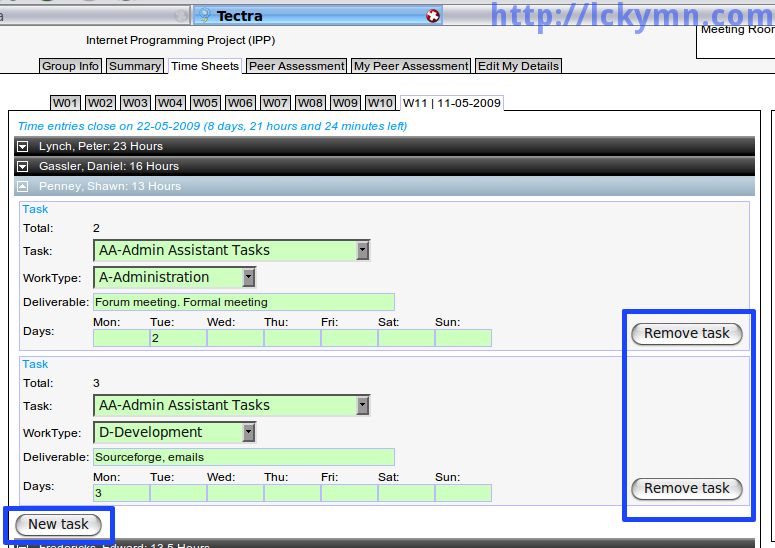
We, the development team of the TeCTra, had a discussion about this and other issues then decided to move the buttons to the right-hand side. Since the front-end is developed by my friend, Sverre, he changed the positions of the remove buttons. My boss, Dr. Richard Raban, also brought other issues so I and my friend took care of all of these and deployed a new version of TeCTra.
Now the remove buttons are all right-justified so users will not click it by chance when they want to click the new task button.
It is good to have an issue tracking system so that the users of software can easily report bugs they found or require new functions they want. This might be good enough yet it is even better if the application itself has issue tracking and feedback functions as I’ve learned from the user feedback function. Thus I am thinking to implement feedback and bug reporting functions which directly add a new ticket to an issue tracking system from my next application development. So it does not only send a feedback email to the developer but also add an issue to the issue tracking system.
As stated in the Ubuntu 9.04 release notes, Ctrl-Alt-Backspace key combination to restart Xorg is disabled.
Ctrl-Alt-Backspace disabled by default in Xorg
The Ctrl-Alt-Backspace key combination to force a restart of X is now disabled by default, to eliminate the problem of accidentally triggering the key combination. Users who do want this function can enable it in their xorg.conf, or by running the command dontzap --disable.
Enable Ctrl+Alt+Backspace Again
Ubuntu Linux 9.10 Karmic Koala
This part is added on the 23rd of November in 2009 as in the 9.10 version, enabling Ctrl+Alt+Backspace is different from doing it in the 9.04 version.
If you are using Ubuntu Linux 9.04 Jaunty Jackalope, please scroll down to skip this part then you can find one for Jaunty Jackalope.
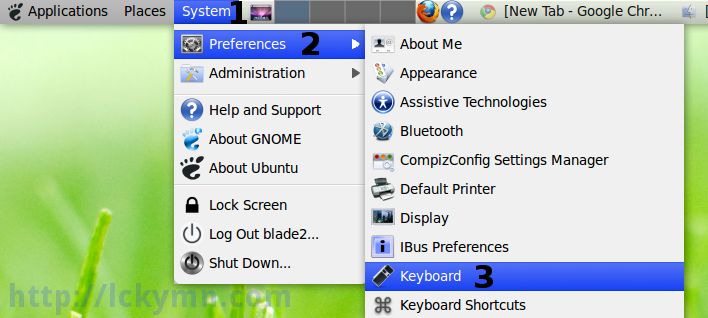
* System -> Preferences -> Keyboard
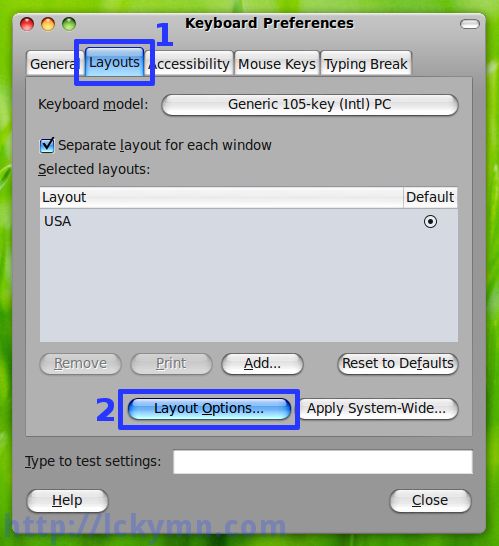
* Select the ‘Layouts’ tab -> Click the ‘Layout Options’ button
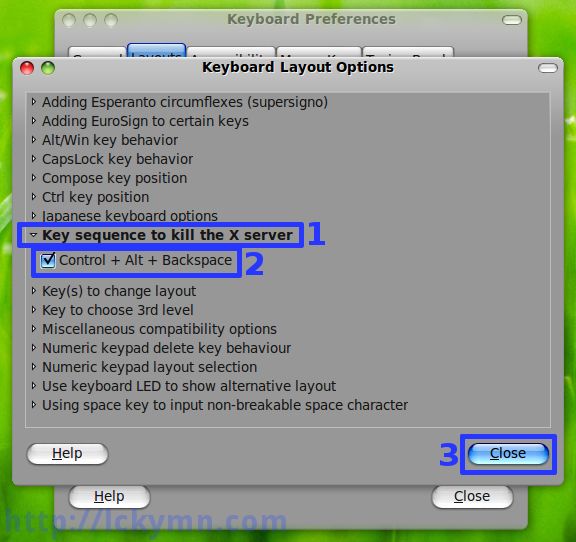
* Click the ‘Key sequence to kill the X server’ to expand it -> Check the ‘Control + Alt + Backspace’ option -> Click the ‘Close’ button
This disallows the use of the Ctrl+Alt+Backspace sequence. That sequence is normally used to terminate the Xorg server. When this option is enabled, that key sequence has no special meaning and is passed to clients. Default: off.
This is Ubuntu Linux 9.04 just released about two days ago (24th, April) as I already mentioned in my previous post.
I used a LiveCD of Ubuntu Linux 9.04 to check if it works well on my PC. It fortunately works well so I upgraded mine from 8.10 to 9.04. The screencast above is made after the upgrade. It looks slow in the video yet that’s because of the software I used to record the desktop. It works really fast indeed without the software used to screencast.
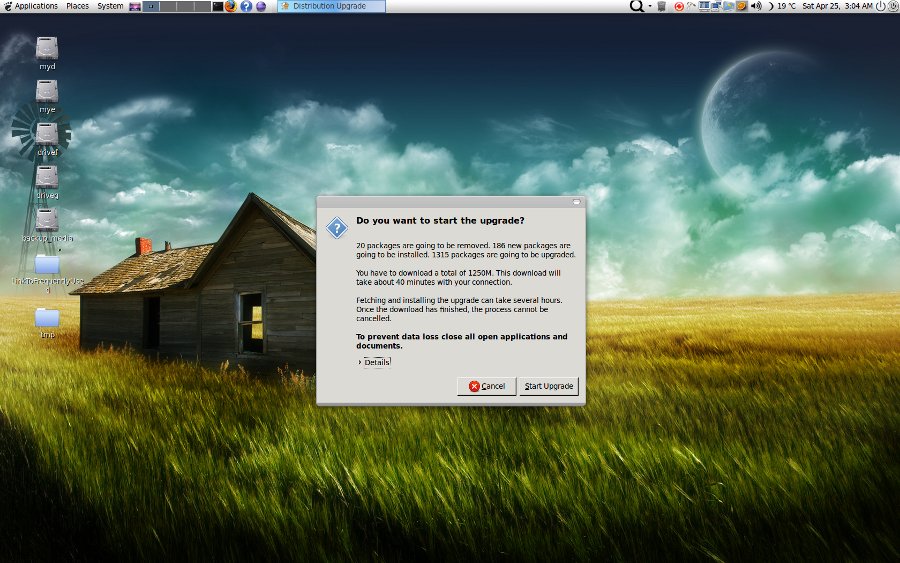
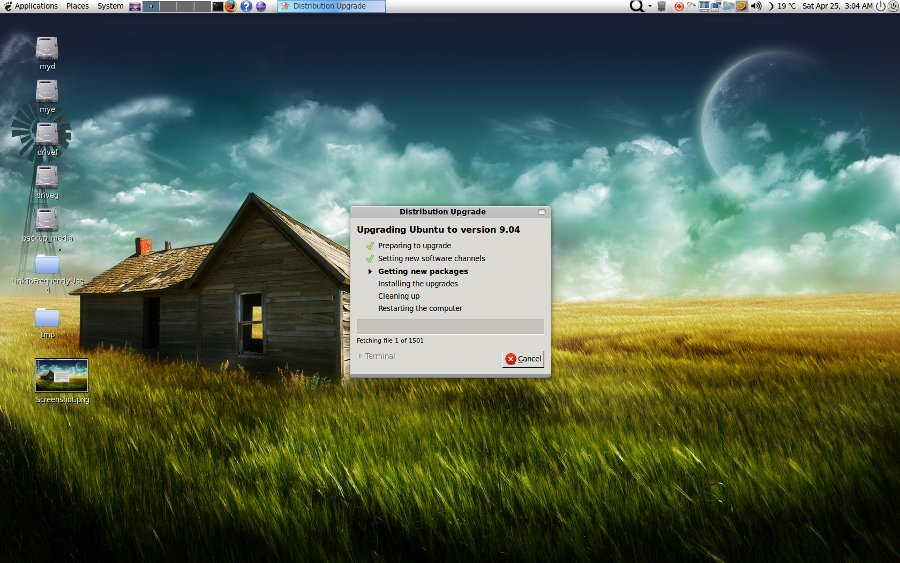
These are screenshots taken before the upgrade.
Start Upgrading to 9.04
Upgrade In Progress
The size of the memory installed on my PC is 4 GiB but it does not have to be 4GiB or bigger. I need 4 GiB for the software I use to develop web applications. Those development tools and servers require lots of memory. However, based on my experience, without using that kind of heavy applications, 2 GiB is enough or even 1 GiB is still fine although for 1 GiB memory I rather recommend Xubuntu which is a type of Ubuntu with Xfce as its desktop environment. Xfce is lightweight and fast.
This part is added on the 3rd of May, 2009
WARNING: If you would like to install Ubuntu 9.04, you had better check out the Ubuntu 9.04 release notes especially the known issues part. http://www.ubuntu.com/getubuntu/releasenotes/904
※ Intel graphics card users should read carefully ‘Performance regressions on Intel graphics cards’ and ‘Display freezes with Intel graphics cards’ issues in the release notes. You may also visit the link below to solve these problems with the Intel graphics cards but follow the post at your own risk. http://www.ubuntugeek.com/intel-graphics-performance-guide-for-ubuntu-904-jaunty-users.html
Compiz also seems to be a bit unstable yet hasn’t crashed. I’m sure the Ubuntu development team will make it stable soon. It normally becomes fairly stable one month after it is released. In the meantime, the users can report all the bugs they found through the issue tracking system for Ubuntu that is Launchpad.
So what I feel about the new release is that it seems to be more stable than the previous release (8.10). I’m quite satisfied so far. The following information is a quick review of the new one.
* The problems in the previous version (8.10) yet fixed in the new version.
-X-Window (probably only GNOME?) freezes if Ctrl+Alt+F1~F6 keys are pressed to enter console mode => Fixed in 9.04
-Firefox freezes with Google toolbar when opening more than one Firefox window. => Fixed in 9.04 (I’m not sure if it was fixed before but I had it when I used 8.04).
-The window decorator of some KDE applications using QT library (e.g. Umbrello, Kompare) disappears and it is impossible to resize the windows of these applications. As far as I remember, it only happens in 64bit version meaning 32bit version doesn’t have it. => Fixed in 9.04
Oh I forgot to say that Ubuntu 9.04 has Open Office 3.0 pre-installed by the way. 🙂
OK, these are what I found so far.
I’m using Compiz, GNOME Do, Cairo Dock and many other useful applications. One good news is that Cairo Dock which is my favourite Dock application can now be found from the Ubuntu repository which means all I need to do in order to install it is to use ‘Add/Remove Application’ menu. 😀 I had to add the Cairo Dock repository manually before if I want to install it or even worse scenario is downloading the deb package file and install it manually.
A new file system namely ext4 which is faster than ext3 is available in Ubuntu 9.04. However, for now it might not be a good idea to use it as there may be some problem like this. https://bugs.edge.launchpad.net/ubuntu/+source/linux/+bug/317781?comments=all
It seems to be fixed though. Anyway, the comments in this bug report post are very interesting. 😀 This might be evidence of how Linux is being evolved by the developers as well as the users of it I believe. 🙂


Recent Comments