Ctrl+Alt+Backspace Disabled
As stated in the Ubuntu 9.04 release notes, Ctrl-Alt-Backspace key combination to restart Xorg is disabled.
Ctrl-Alt-Backspace disabled by default in Xorg
The Ctrl-Alt-Backspace key combination to force a restart of X is now disabled by default, to eliminate the problem of accidentally triggering the key combination. Users who do want this function can enable it in their xorg.conf, or by running the command
dontzap --disable.
Enable Ctrl+Alt+Backspace Again
Ubuntu Linux 9.10 Karmic Koala
Ctrl+Alt+Backspace is different from doing it in the 9.04 version.If you are using Ubuntu Linux 9.04 Jaunty Jackalope, please scroll down to skip this part then you can find one for Jaunty Jackalope.
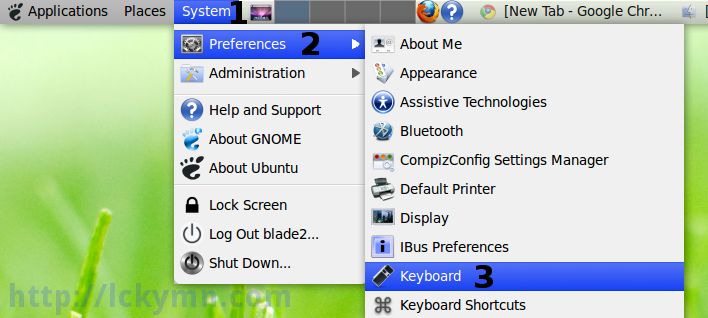
* System -> Preferences -> Keyboard
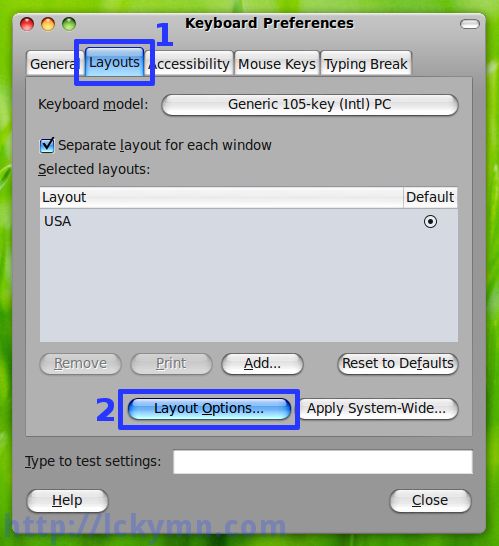
* Select the ‘Layouts’ tab -> Click the ‘Layout Options’ button
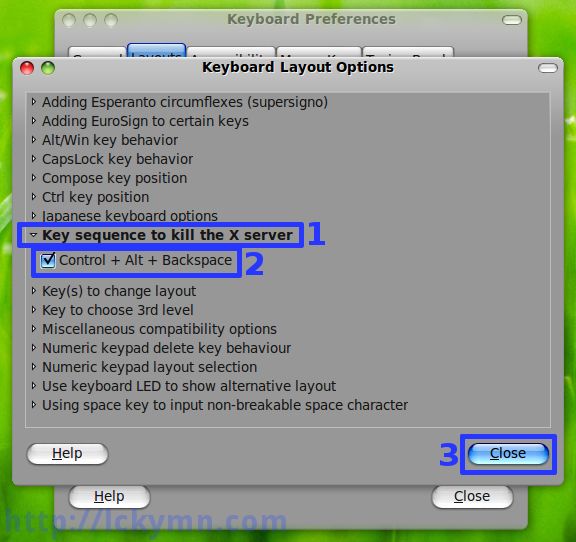
* Click the ‘Key sequence to kill the X server’ to expand it -> Check the ‘Control + Alt + Backspace’ option -> Click the ‘Close’ button
Done!!!
Ubuntu Linux 9.04 Jaunty Jackalope
* Open the /etc/X11/xorg.conf file and add
Section "ServerFlags"
	Option	"DontZap"	"False"
EndSection
* Or simply use dontzap.
* If it is not installed already,
$ sudo apt-get install dontzap
* Use the dontzap command to enable Ctrl+Alt+Backspace
$ sudo dontzap --disable
This acually adds
Section "ServerFlags"
	Option	"DontZap"	"False"
EndSection
to the /etc/X11/xorg.conf file.
* After it is done, make sure to log out & in for the change to take effect.
* To enable the “DontZap” option again,
$ sudo dontzap --enable
* More information about the DontZap option.
http://www.x.org/archive/X11R6.8.0/doc/xorg.conf.5.html#sect4
Option "DontZap" "boolean"This disallows the use of the Ctrl+Alt+Backspace sequence. That sequence is normally used to terminate the Xorg server. When this option is enabled, that key sequence has no special meaning and is passed to clients. Default: off.

Has this recently broken? It worked briefly for me and now no matter what I do, I can’t get zapping back.
Sorry, I don’t get it. Could you explain more details?
Great post! I’ll subscribe right now wth my feedreader software!
Thanks, just what I was looking for.