I can still see many tutorials of JDBC that are not really talking about how JDBC programming can be done easily and more practically & efficiently. I can understand that those tutorials are to give a very basic level of knowledge of JDBC. Besides, we do often not use JDBC directly any more these days. There are easier and simpler solutions like Object Relational Mapping (ORM) and other persistence frameworks. I use Java Persistence API (JPA) with Hibernate and QueryDSL (Personally, I think QueryDSL is great. I cannot imagine life without QueryDSL anymore when using JPA. 🙂 ). There are also other choices. For instance, EclipseLink and OpenJPA both of which are JPA implementations, Java Data Objects (JDO), MyBatis, the successor of iBATIS, and so on.
However, there may come a time when you need to directly use JDBC. It can be developing an application which requires accessing and using database or for developing your own Java persistence framework. One way or another it is good to learn this very fundamental Java persistence technology to get some good things from it as well as its drawback in order to avoid it. I am not going to talk about what JDBC is or how to use it as there are plenty of other tutorials explaining these on the Internet. What I am going to do is talking about better and easier way to use JDBC. I will not cover every single detail about it though, as my point here is giving some idea to use it better and there are already known solutions that provide what I am going to explain.
There are four steps to take to explain the better way of using JDBC. First of all, I will show a typical way to use JDBC then point out problems in it. After that analyse it to find a better way. Finally, I will implement it.
Preparation
Database and JDBC Driver
In my examples, I’ve used MySQL 5.1 and MySQL Connection/J 5.1.17 downloaded from the Connector/J download page on the MySQL website.
mysql-connector-java-5.1.17.zip
If you don’t want to become a user of the site, you can click the “No thanks, just take me to the downloads!” link at the bottom.
What you need is only one jar file that is mysql-connector-java-5.1.17-bin.jar in the zip file.
Java Beans
There are three JavaBeans used in the example to contain the data from the database.
public class Person
{
  private Long id;
  private String surname;
  private String givenName;
  private Address address;

  // getters and setters omitted.
}
public class Address
{
  private String street;
  private String suburb;
  private String state;
  private String country;
  private String postcode;
  private Date birthday;

  // constructors, getters and setters omitted.
}
import java.util.Date;

public class Book
{
  private Long id;
  private String title;
  private String authours;
  private String edition;
  private String isbn10;
  private String isbn13;
  private String publisher;
  private Date publishingDate;

  // getters and setters omitted.
}
1. Typical Way to Use JDBC
Here is a very typical way to use JDBC when retrieving data from the database.
Connection connection = null;
PreparedStatement statement = null;
ResultSet resultSet = null;

try
{
  // get connection.
  connection = DriverManager.getConnection("jdbc:mysql://localhost:3306/testdb",
                                           "testuser",
                                           "1234");

  final String sql = "SELECT * FROM people";

  // get PreparedStatement
  statement = connection.prepareStatement(sql);

  // run the query and get the result stored in the ResultSet.
  resultSet = statement.executeQuery();

  final List<Person> people = new ArrayList<Person>();
  while (resultSet.next())
  {
    // Map each row to a Person object and add it to the Person List, people.
    final Person person = new Person();
    person.setId(resultSet.getLong("person_id"));
    person.setSurname(resultSet.getString("surname"));
    person.setGivenName(resultSet.getString("given_name"));
    final Address address =
      new Address(resultSet.getString("street"),
          resultSet.getString("city"),
          resultSet.getString("state"),
          resultSet.getString("country"),
          resultSet.getString("postcode"));
    person.setAddress(address);
    person.setBirthday(new Date(resultSet
                          .getDate("birthday")
                          .getTime()));
    people.add(person);
  }
  System.out.println(people);
}
catch (final SQLException e)
{
  // you MUST catch SQLException exception
  // or add the throws clause having SQLException to the method declaration.
  e.printStackTrace();
}
finally
{
  // close ResultSet, PreparedStatement and Connection.
  if (null != resultSet)
  {
    try
    {
      resultSet.close();
    }
    catch (final SQLException e)
    {
      e.printStackTrace();
    }
  }
  if (null != statement)
  {
    try
    {
      statement.close();
    }
    catch (final SQLException e)
    {
      e.printStackTrace();
    }
  }
  if (null != connection)
  {
    try
    {
      connection.close();
    }
    catch (final SQLException e)
    {
      e.printStackTrace();
    }
  }
}
2. Problems
Now, I will make DAOs for Person and Book objects to examine what issues we can have when we follow the typical way to use JDBC mentioned above. Here is the PersonDao interface.
package com.lckymn.kevin.tutorial.jdbc_old.dao;

import java.util.List;

import com.lckymn.kevin.tutorial.jdbc_old.beans.Person;

public interface PersonDao
{
  Person find(Long id);
  List<Person> findPeopleByState(String state);
  List<Person> getAllPeople();
}
The following one is the BookDao interface.
package com.lckymn.kevin.tutorial.jdbc_old.dao;

import java.util.List;

import com.lckymn.kevin.tutorial.jdbc_old.beans.Book;

public interface BookDao
{
  Book find(Long id);
  List<Book> findBooksByPublisher(String publisher);
}
Before making the implementations of these, I will create an abstract class for both DAOs.
import java.sql.Connection;
import java.sql.DriverManager;
import java.sql.SQLException;

public abstract class AbstractDao
{
  private final String url;
  private final String username;
  private final String password;

  public AbstractDao(final String url, final String username, final String password)
  {
    this.url = url;
    this.username = username;
    this.password = password;
  }

  protected final Connection getConnection() throws SQLException
  {
    /*
     * depending on the version of JDBC (prior to 4.0) you may need to load the driver first.
     */
    return DriverManager.getConnection(url, username, password);
  }
}
Or for better use of database connection, Using Connection Pool and DataSource is desirable.
import java.sql.Connection;
import java.sql.SQLException;

import javax.sql.DataSource;

public abstract class AbstractDao
{
  private final DataSource dataSource;

  public AbstractDao(final DataSource dataSource)
  {
    this.dataSource = dataSource;
  }

  protected final Connection getConnection() throws SQLException
  {
    return dataSource.getConnection();
  }
}
Here is the implementation of PersonDao. The PersonDao extends AbstractDao thus it can get the Connection from the getConnection() method in the super class.
package com.lckymn.kevin.tutorial.jdbc_old.dao.impl;

import java.sql.Connection;
import java.sql.PreparedStatement;
import java.sql.ResultSet;
import java.sql.SQLException;
import java.util.ArrayList;
import java.util.List;

import com.lckymn.kevin.tutorial.jdbc_old.beans.Address;
import com.lckymn.kevin.tutorial.jdbc_old.beans.Person;
import com.lckymn.kevin.tutorial.jdbc_old.dao.AbstractDao;
import com.lckymn.kevin.tutorial.jdbc_old.dao.PersonDao;

public class PersonDaoImpl extends AbstractDao implements PersonDao
{
  // constructor omitted...

  @Override
  public Person find(final Long id)
  {
    Connection connection = null;
    PreparedStatement statement = null;
    ResultSet resultSet = null;

    final List<Person> result = new ArrayList<Person>();
    try
    {
      connection = getConnection();
      final String sql = "SELECT * FROM people WHERE person_id = ?";
      statement = connection.prepareStatement(sql);
      statement.setLong(1, id);
      resultSet = statement.executeQuery();
      while (resultSet.next())
      {
        final Person person = new Person();
        person.setId(resultSet.getLong("person_id"));
        person.setSurname(resultSet.getString("surname"));
        person.setGivenName(resultSet.getString("given_name"));
        final Address address =
          new Address(resultSet.getString("street"),
              resultSet.getString("city"),
              resultSet.getString("state"),
              resultSet.getString("country"),
              resultSet.getString("postcode"));
        person.setAddress(address);
        person.setBirthday(new Date(resultSet
                              .getDate("birthday")
                              .getTime()));
        result.add(person);
      }
    }
    catch (final SQLException e)
    {
      e.printStackTrace();
    }
    finally
    {
      if (null != resultSet)
        try { resultSet.close(); }
        catch (final SQLException e) { e.printStackTrace(); }

      if (null != statement)
        try { statement.close(); }
        catch (final SQLException e) { e.printStackTrace(); }

      if (null != connection)
        try { connection.close(); }
        catch (final SQLException e) { e.printStackTrace(); }
    }
    return result.isEmpty() ? null : result.get(0);
  }

  @Override
  public List<Person> findPeopleByState(final String state)
  {
    Connection connection = null;
    PreparedStatement statement = null;
    ResultSet resultSet = null;

    final List<Person> result = new ArrayList<Person>();
    try
    {
      connection = getConnection();
      final String sql = "SELECT * FROM people WHERE state = ?";
      statement = connection.prepareStatement(sql);
      statement.setString(1, state);
      resultSet = statement.executeQuery();
      while (resultSet.next())
      {
        final Person person = new Person();
        person.setId(resultSet.getLong("person_id"));
        person.setSurname(resultSet.getString("surname"));
        person.setGivenName(resultSet.getString("given_name"));
        final Address address =
          new Address(resultSet.getString("street"),
              resultSet.getString("city"),
              resultSet.getString("state"),
              resultSet.getString("country"),
              resultSet.getString("postcode"));
        person.setAddress(address);
        person.setBirthday(new Date(resultSet
                              .getDate("birthday")
                              .getTime()));
        result.add(person);
      }
    }
    catch (final SQLException e)
    {
      e.printStackTrace();
    }
    finally
    {
      if (null != resultSet)
        try { resultSet.close(); }
        catch (final SQLException e) { e.printStackTrace(); }

      if (null != statement)
        try { statement.close(); }
        catch (final SQLException e) { e.printStackTrace(); }

      if (null != connection)
        try { connection.close(); }
        catch (final SQLException e) { e.printStackTrace(); }
    }
    return result;
  }

  @Override
  public List<Person> getAllPeople()
  {
    Connection connection = null;
    PreparedStatement statement = null;
    ResultSet resultSet = null;

    final List<Person> result = new ArrayList<Person>();
    try
    {
      connection = getConnection();
      final String sql = "SELECT * FROM people";
      statement = connection.prepareStatement(sql);
      resultSet = statement.executeQuery();
      while (resultSet.next())
      {
        final Person person = new Person();
        person.setId(resultSet.getLong("person_id"));
        person.setSurname(resultSet.getString("surname"));
        person.setGivenName(resultSet.getString("given_name"));
        final Address address =
          new Address(resultSet.getString("street"),
              resultSet.getString("city"),
              resultSet.getString("state"),
              resultSet.getString("country"),
              resultSet.getString("postcode"));
        person.setAddress(address);
        person.setBirthday(new Date(resultSet
                              .getDate("birthday")
                              .getTime()));
        result.add(person);
      }
    }
    catch (final SQLException e)
    {
      e.printStackTrace();
    }
    finally
    {
      if (null != resultSet)
        try { resultSet.close(); }
        catch (final SQLException e) { e.printStackTrace(); }

      if (null != statement)
        try { statement.close(); }
        catch (final SQLException e) { e.printStackTrace(); }

      if (null != connection)
        try { connection.close(); }
        catch (final SQLException e) { e.printStackTrace(); }
    }
    return result;
  }
}
As you can see, there is too much boilerplate code here. Then what about the implementation of BookDao?
package com.lckymn.kevin.tutorial.jdbc_old.dao.impl;

import java.sql.Connection;
import java.sql.PreparedStatement;
import java.sql.ResultSet;
import java.sql.SQLException;
import java.util.ArrayList;
import java.util.List;

import com.lckymn.kevin.tutorial.jdbc_old.beans.Book;
import com.lckymn.kevin.tutorial.jdbc_old.dao.AbstractDao;
import com.lckymn.kevin.tutorial.jdbc_old.dao.BookDao;

public class BookDaoImpl extends AbstractDao implements BookDao
{
  public BookDaoImpl(final String url, final String username, final String password)
  {
    super(url, username, password);
  }

  @Override
  public Book find(final Long id)
  {
    Connection connection = null;
    PreparedStatement statement = null;
    ResultSet resultSet = null;

    final List<Book> result = new ArrayList<Book>();
    try
    {
      connection = getConnection();
      final String sql = "SELECT * FROM book WHERE book_id = ?";
      statement = connection.prepareStatement(sql);
      statement.setLong(1, id);
      resultSet = statement.executeQuery();
      while (resultSet.next())
      {
        final Book book = new Book();
        book.setId(resultSet.getLong("book_id"));
        book.setTitle(resultSet.getString("title"));
        book.setAuthours(resultSet.getString("authours"));
        book.setEdition(resultSet.getString("edition"));
        book.setIsbn10(resultSet.getString("isbn10"));
        book.setIsbn13(resultSet.getString("isbn13"));
        book.setPublisher(resultSet.getString("publisher"));
        book.setPublishingDate(resultSet.getDate("publishing_date"));
        result.add(book);
      }
    }
    catch (final SQLException e)
    {
      e.printStackTrace();
    }
    finally
    {
      if (null != resultSet)
        try { resultSet.close(); }
        catch (final SQLException e) { e.printStackTrace(); }

      if (null != statement)
        try { statement.close(); }
        catch (final SQLException e) { e.printStackTrace(); }

      if (null != connection)
        try { connection.close(); }
        catch (final SQLException e) { e.printStackTrace(); }
    }
    return result.isEmpty() ? null : result.get(0);
  }

  @Override
  public List<Book> findBooksByPublisher(final String publisher)
  {
    Connection connection = null;
    PreparedStatement statement = null;
    ResultSet resultSet = null;

    final List<Book> result = new ArrayList<Book>();
    try
    {
      connection = getConnection();
      final String sql = "SELECT * FROM book WHERE publisher = ?";
      statement = connection.prepareStatement(sql);
      statement.setString(1, publisher);
      resultSet = statement.executeQuery();
      while (resultSet.next())
      {
        final Book book = new Book();
        book.setId(resultSet.getLong("book_id"));
        book.setTitle(resultSet.getString("title"));
        book.setAuthours(resultSet.getString("authours"));
        book.setEdition(resultSet.getString("edition"));
        book.setIsbn10(resultSet.getString("isbn10"));
        book.setIsbn13(resultSet.getString("isbn13"));
        book.setPublisher(resultSet.getString("publisher"));
        book.setPublishingDate(resultSet.getDate("publishing_date"));
        result.add(book);
      }
    }
    catch (final SQLException e)
    {
      e.printStackTrace();
    }
    finally
    {
      if (null != resultSet)
        try { resultSet.close(); }
        catch (final SQLException e) { e.printStackTrace(); }

      if (null != statement)
        try { statement.close(); }
        catch (final SQLException e) { e.printStackTrace(); }

      if (null != connection)
        try { connection.close(); }
        catch (final SQLException e) { e.printStackTrace(); }
    }
    return result;
  }
}
Just the same… OK, now I will compare just one method in each DAO and try to find if there are any similarities in these methods. One method from PersonDaoImpl is findPeopleByState(String) and the other one from BookDaoImpl is findBooksByPublisher(String).
Let’s see what are different.
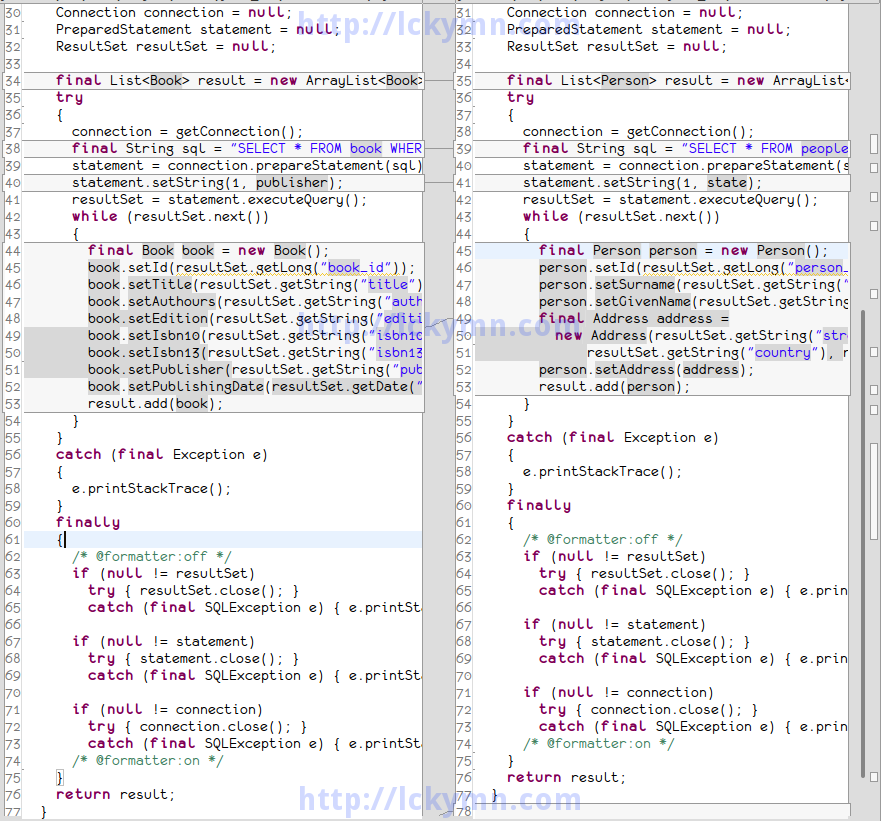
Method Comparison Between PersonDao and BookDao
As you can see, except for a few parts highlighted, I’ve just repeated the same code. That means if the user of the DAO can dynamically give the code for these few differences when using it, I do not need to repeat the same code over and over again.
There is another problem in the catch block that catches the SQLException which can be thrown in the try block containing the main part of the code snippet.
}
catch (final SQLException e)
{
  e.printStackTrace(); // It just prints the StackTrace and ignores the exception.
}
finally
{
It just prints the StackTrace and ignores the exception, and this may cause a more serious problem as the exception is simply ignored so the programmers cannot easily find what went wrong. I need to deal with it too.
3. Finding Better Way
I will create a JdbcManager which takes care of selection, insertion, update and deletion of data.
I will try something very easy to do first. In the typical DAO code, every method has a finally block having really ugly code snippet to close ResultSet, Statement and Connection. I am sick of it so want to get rid of it first, but I cannot simply remove that code as it’s absolutely necessary therefore it’s there. Then I can make a method which closes those objects quietly without throwing any exception, for it’s already in the finally block and there might be already an exception thrown. So I don’t want the finally block to throw another exception which interrupts the fist exception.
My JdbcManager class will have the following method to close ResultSet, Statement and Connection.
private void closeQuietly(final Connection connection,
                          final PreparedStatement statement,
                          final ResultSet resultSet)
{
  if (null != resultSet)
    try { resultSet.close(); }
    catch (final SQLException e) { e.printStackTrace(); } // or log properly

  if (null != statement)
    try { statement.close(); }
    catch (final SQLException e) { e.printStackTrace(); } // or log properly

  if (null != connection)
    try { connection.close(); }
    catch (final SQLException e) { e.printStackTrace(); } // or log properly
}
So now findPeopleByState(String) looks like this.
public List<Person> findPeopleByState(final String state)
{
  Connection connection = null;
  PreparedStatement statement = null;
  ResultSet resultSet = null;

  final List<Person> result = new ArrayList<Person>();
  try
  {
    connection = getConnection();
    final String sql = "SELECT * FROM people WHERE state = ?";
    statement = connection.prepareStatement(sql);
    statement.setString(1, state);
    resultSet = statement.executeQuery();
    while (resultSet.next())
    {
      final Person person = new Person();
      person.setId(resultSet.getLong("person_id"));
      person.setSurname(resultSet.getString("surname"));
      person.setGivenName(resultSet.getString("given_name"));
      final Address address =
        new Address(resultSet.getString("street"),
                    resultSet.getString("city"),
                    resultSet.getString("state"),
                    resultSet.getString("country"),
                    resultSet.getString("postcode"));
      person.setAddress(address);
      person.setBirthday(new Date(resultSet
                            .getDate("birthday")
                            .getTime()));
      result.add(person);
    }
  }
  catch (final SQLException e)
  {
    e.printStackTrace();
  }
  finally
  {
    closeQuietly(connection, statement, resultSet);
  }
  return result;
}
Now think about the highlighted lines that are different depending on what type of object should be returned.
The first one is the method signature. I will talk about the parameters later and now focus on only the return type.
public List<Person> findPeopleByState(final String state)
It returns a List of Person but what if I want to get a List of Book? So the return type is of type List, but the type of the element should be contained in the List is undecided. It should be pending until the user of the method specifies it. In this kind of situation, what do we normally use? When we design an API and want to defer specifying what type to use until the user of the API decides it with providing compile-time type safety, we use Generics in Java.
So I can just easily make the method a generic method so that the return type would be depending on how the user of the method uses it.
public <T> T findPeopleByState( *don't worry about params for a while* )
The second part is the same, I don’t know what type of object the user wants to have in the List, so I just use a generic type parameter T.
So I’ve changed this
final List<Person> result = new ArrayList<Person>();
to
final List<T> result = new ArrayList<T>();
The third one is easy. It can easily become a parameter of the method.
final String sql = "SELECT * FROM people WHERE state = ?";
So the method signature would be like
public <T> T findPeopleByState(String sql, *don't worry about the rest params for now* )
Next one also looks simple. It’s just one line of code. Well, it is one line in this example but can be many lines depending on the given parameter values.
statement.setString(1, state);
So it might be like
statement.setLong(1, longValue);
statement.setString(2, stringValue);
statement.setBoolean(3, booleanValue);
So it seems like it will possibly have many parameters from the user of my method. So I think I should use some kind of Collection type containing the parameters or an array of Object containing these because the types of the parameters can vary. Wait. More conveniently I can just use varargs so that the user of my method doesn’t need to create any extra instance of collection or array to pass the parameters although using varargs results in creation of an array by compiler, yet in the user’s point of view, it’s hidden so can be very convenient.
public <T> T findPeopleByState(String sql,
                               //possibly more params here
                               Object ... params)
The types of the parameters can vary so I put Object type varargs. Now I need to set the parameters to the PreparedStatement. Since the varargs is actually an array, I can iterate over it to get each parameter then I use an index to get a parameter and index + 1 to set the parameterIndex in the PreparedStatement as it starts from 1. I will cover here only primitive types (including boxed ones), String and other commonly used reference types in db programming which are Date, Calendar and BigDecimal. All the other types will cause an IllegalArgumentException. It can of course improve but I am just giving an idea to use it better so am trying to make it just simple enough to understand with providing the idea. So the code would be
private void setParameters(final PreparedStatement statement, final Object... parameters) throws SQLException
{
  for (int i = 0, length = parameters.length; i < length; i++)
  {
    final Object parameter = parameters[i];
    final int parameterIndex = i + 1;
    if (null == parameter)
    {
      statement.setObject(parameterIndex, null);
    }
    else if (parameter instanceof Boolean)
    {
      statement.setBoolean(parameterIndex, (Boolean) parameter);
    }
    else if (parameter instanceof Character)
    {
      statement.setString(parameterIndex, String.valueOf(parameter));
    }
    else if (parameter instanceof Byte)
    {
      statement.setByte(parameterIndex, (Byte) parameter);
    }
    else if (parameter instanceof Short)
    {
      statement.setShort(parameterIndex, (Short) parameter);
    }
    else if (parameter instanceof Integer)
    {
      statement.setInt(parameterIndex, (Integer) parameter);
    }
    else if (parameter instanceof Long)
    {
      statement.setLong(parameterIndex, (Long) parameter);
    }
    else if (parameter instanceof Float)
    {
      statement.setFloat(parameterIndex, (Float) parameter);
    }
    else if (parameter instanceof Double)
    {
      statement.setDouble(parameterIndex, (Double) parameter);
    }
    else if (parameter instanceof String)
    {
      statement.setString(parameterIndex, (String) parameter);
    }
    else if (parameter instanceof Date)
    {
      statement.setDate(parameterIndex, new java.sql.Date(((Date) parameter)
                                            .getTime()));
    }
    else if (parameter instanceof Calendar)
    {
      statement.setDate(parameterIndex, new java.sql.Date(((Calendar) parameter)
                                            .getTimeInMillis()));
    }
    else if (parameter instanceof BigDecimal)
    {
      statement.setBigDecimal(parameterIndex, (BigDecimal) parameter);
    }
    else
    {
      throw new IllegalArgumentException(String.format(
          "Unknown type of the parameter is found. [param: %s, paramIndex: %s]",
          parameter,
          parameterIndex));
    }
  }
}
It can be used by other methods in the JdbcManager as well, so I made it a method.
Next is
while (resultSet.next())
{
  final Person person = new Person();
  person.setId(resultSet.getLong("person_id"));
  person.setSurname(resultSet.getString("surname"));
  person.setGivenName(resultSet.getString("given_name"));
  final Address address =
    new Address(resultSet.getString("street"),
                resultSet.getString("city"),
                resultSet.getString("state"),
                resultSet.getString("country"),
                resultSet.getString("postcode"));
  person.setAddress(address);
  person.setBirthday(new Date(resultSet
                        .getDate("birthday")
                        .getTime()));
  result.add(person);
}
The highlighted part should be done by the user of the API. The JdbcManager does’t know what should be there nor can it guess what data the user of it wants to retrieve from the database. It looks like I can use Callback here. Java does not have First-Class Function yet (Java will have First-Class Function in the form of lambda expression in the Java SE 8. Click here to get more details about Project Lambda), but I can define an interface which maps data in a ResultSet row to a Java object and let the user pass an instance of class implementing the interface or an anonymous class instance of the interface can be used too.
What I need to consider is the return type and the ResultSet as I’m now trying to map the data in the ResultSet to a Java object (return type). So the mapper interface should look like.
package com.lckymn.kevin.tutorial.jdbc_better.jdbc;

import java.sql.ResultSet;
import java.sql.SQLException;

public interface RowMapper<T>
{
  T map(ResultSet resultSet) throws SQLException;
}
Notice that I’ve also added the throws clause having SQLException as using ResultSet requires it and that’s why we put try-catch block in our code using JDBC. The SQLException thrown in the map() method will be handled by the try-catch block in the main part of the JdbcManager select() method.
There is one last issue left. Now I need to take care of ignoring SQLException in the catch block.
}
catch (final SQLException e)
{
  e.printStackTrace();
}
finally
I can properly log it instead of just calling the printStackTrace() method in the SQLException, but it’s not enough. I don’t want to just ignore it as it may cause some serious issue in runtime. However, I don’t want to re-throw it either because then the caller of this method or “the caller of the caller” of the method or in the worst case, all the methods in the method call hierarchy have to deal with the SQLException. Thus I want to create my own unchecked exception (an exception that extends RuntimeException) which wraps the SQLException. It is beneficial not only because the caller of the method doesn’t need to catch or re-throw it but because it is also understandable by the caller of the method even after I decide not to use JDBC at all so it doesn’t have any SQLException any more. In this case, if I used SQLException, I would have to change the code in the caller-side as the caller would directly deal with it.
Here is my new Exception for data access.
package com.lckymn.kevin.tutorial.jdbc_better.exception;

public class DataAccessException extends RuntimeException
{
  private static final long serialVersionUID = 1L;

  public DataAccessException()
  {
  }

  public DataAccessException(final String message, final Throwable cause)
  {
    super(message, cause);
  }

  public DataAccessException(final String message)
  {
    super(message);
  }

  public DataAccessException(final Throwable cause)
  {
    super(cause);
  }
}
I also want to have another exception that extends it in order to indicate data access connection failure.
package com.lckymn.kevin.tutorial.jdbc_better.exception;

public class DataAccessConnectionFailureException extends DataAccessException
{
  private static final long serialVersionUID = 1L;

  public DataAccessConnectionFailureException(final Throwable cause)
  {
    super(cause);
  }
}
Finally one for general data access operation problems.
package com.lckymn.kevin.tutorial.jdbc_better.exception;

public class DataAccessOperationErrorException extends DataAccessException
{
  private static final long serialVersionUID = 1L;

  public DataAccessOperationErrorException()
  {
  }

  public DataAccessOperationErrorException(final String message, final Throwable cause)
  {
    super(message, cause);
  }

  public DataAccessOperationErrorException(final String message)
  {
    super(message);
  }

  public DataAccessOperationErrorException(final Throwable cause)
  {
    super(cause);
  }
}
I can replace the old code that prints stack trace with
}
catch (final SQLException e)
{
  throw new DataAccessOperationErrorException(e);
}
finally
So with all the solutions I mentioned above, my new code now becomes
public <T> List<T> select(final String sql,
                          final RowMapper<T> rowMapper,
                          final Object... parameters)
      throws DataAccessException
{
  Connection connection = null;
  PreparedStatement statement = null;
  ResultSet resultSet = null;

  final List<T> result = new ArrayList<T>();
  try
  {
    connection = getConnection();
    statement = connection.prepareStatement(sql);
    setParameters(statement, parameters);
    resultSet = statement.executeQuery();
    while (resultSet.next())
    {
      result.add(rowMapper.map(resultSet));
    }
  }
  catch (final SQLException e)
  {
    throw new DataAccessOperationFailureException(e);
  }
  finally
  {
    closeQuietly(connection, statement, resultSet);
  }
  return result;
}
It’s time to use it. Before using it, I’ll show my JdbcManager interface and the implementing class.
package com.lckymn.kevin.tutorial.jdbc_better.jdbc;
import java.util.List;
import com.lckymn.kevin.tutorial.jdbc_better.exception.DataAccessException;
/**
* @author Lee, SeongHyun (Kevin) / <a href="https://old-blog.kevinlee.io">Kevin's Blog</a>
* @version 0.0.1 (2011-09-04)
*/
public interface JdbcManager
{
<T> List<T> select(String sql, RowMapper<T> rowMapper, Object... parameters) throws DataAccessException;
int update(final String sql, final Object... parameters) throws DataAccessException;
}
package com.lckymn.kevin.tutorial.jdbc_better.jdbc.impl;
import java.math.BigDecimal;
import java.sql.Connection;
import java.sql.PreparedStatement;
import java.sql.ResultSet;
import java.sql.SQLException;
import java.sql.Statement;
import java.util.ArrayList;
import java.util.Calendar;
import java.util.Date;
import java.util.List;
import javax.sql.DataSource;
import com.lckymn.kevin.tutorial.jdbc_better.exception.DataAccessConnectionFailureException;
import com.lckymn.kevin.tutorial.jdbc_better.exception.DataAccessException;
import com.lckymn.kevin.tutorial.jdbc_better.exception.DataAccessOperationErrorException;
import com.lckymn.kevin.tutorial.jdbc_better.jdbc.JdbcManager;
import com.lckymn.kevin.tutorial.jdbc_better.jdbc.RowMapper;
/**
* @author Lee, SeongHyun (Kevin) / <a href="https://old-blog.kevinlee.io">Kevin's Blog</a>
* @version 0.0.1 (2011-09-04)
*/
public class JdbcManagerImpl implements JdbcManager
{
private final DataSource dataSource;
public JdbcManagerImpl(final DataSource dataSource)
{
this.dataSource = dataSource;
}
protected final Connection getConnection()
{
try
{
return dataSource.getConnection();
}
catch (final SQLException e)
{
throw new DataAccessConnectionFailureException(e);
}
}
private void closeQuietly(final Connection connection,
final PreparedStatement statement,
final ResultSet resultSet)
{
if (null != resultSet)
try { resultSet.close(); }
catch (final SQLException e) { e.printStackTrace(); }
if (null != statement)
try { statement.close(); }
catch (final SQLException e) { e.printStackTrace(); }
if (null != connection)
try { connection.close(); }
catch (final SQLException e) { e.printStackTrace(); }
}
private void setParameters(final PreparedStatement statement, final Object... parameters) throws SQLException
{
for (int i = 0, length = parameters.length; i < length; i++)
{
final Object parameter = parameters[i];
final int parameterIndex = i + 1;
if (null == parameter)
{
statement.setObject(parameterIndex, null);
}
else if (parameter instanceof Boolean)
{
statement.setBoolean(parameterIndex, (Boolean) parameter);
}
else if (parameter instanceof Character)
{
statement.setString(parameterIndex, String.valueOf(parameter));
}
else if (parameter instanceof Byte)
{
statement.setByte(parameterIndex, (Byte) parameter);
}
else if (parameter instanceof Short)
{
statement.setShort(parameterIndex, (Short) parameter);
}
else if (parameter instanceof Integer)
{
statement.setInt(parameterIndex, (Integer) parameter);
}
else if (parameter instanceof Long)
{
statement.setLong(parameterIndex, (Long) parameter);
}
else if (parameter instanceof Float)
{
statement.setFloat(parameterIndex, (Float) parameter);
}
else if (parameter instanceof Double)
{
statement.setDouble(parameterIndex, (Double) parameter);
}
else if (parameter instanceof String)
{
statement.setString(parameterIndex, (String) parameter);
}
else if (parameter instanceof Date)
{
statement.setDate(parameterIndex, new java.sql.Date(((Date) parameter).getTime()));
}
else if (parameter instanceof Calendar)
{
statement.setDate(parameterIndex, new java.sql.Date(((Calendar) parameter).getTimeInMillis()));
}
else if (parameter instanceof BigDecimal)
{
statement.setBigDecimal(parameterIndex, (BigDecimal) parameter);
}
else
{
throw new IllegalArgumentException(String.format(
"Unknown type of the parameter is found. [param: %s, paramIndex: %s]", parameter, parameterIndex));
}
}
}
@Override
public <T> List<T> select(final String sql,
final RowMapper<T> rowMapper,
final Object... parameters)
throws DataAccessException
{
Connection connection = null;
PreparedStatement statement = null;
ResultSet resultSet = null;
final List<T> result = new ArrayList<T>();
try
{
connection = getConnection();
statement = connection.prepareStatement(sql);
setParameters(statement, parameters);
resultSet = statement.executeQuery();
while (resultSet.next())
{
result.add(rowMapper.map(resultSet));
}
}
catch (final SQLException e)
{
throw new DataAccessOperationErrorException(e);
}
finally
{
closeQuietly(connection, statement, resultSet);
}
return result;
}
// the rest code omitted...
}
Then my AbstractDao now has the JdbcManager.
package com.lckymn.kevin.tutorial.jdbc_better.dao;
import com.lckymn.kevin.tutorial.jdbc_better.jdbc.JdbcManager;
/**
* @author Lee, SeongHyun (Kevin) / <a href="https://old-blog.kevinlee.io">Kevin's Blog</a>
* @version 0.0.1 (2011-09-04)
*/
public abstract class AbstractDao
{
private JdbcManager jdbcManager;
public AbstractDao(final JdbcManager jdbcManager)
{
this.jdbcManager = jdbcManager;
}
protected final JdbcManager jdbcManager()
{
return jdbcManager;
}
}
So the old DAO methods now look like
@Override
public Person find(final Long id)
{
  final List<Person> result =
    jdbcManager().select("SELECT * FROM people WHERE person_id = ?", new RowMapper<Person>() {

      @Override
      public Person map(final ResultSet resultSet) throws SQLException
      {
        final Person person = new Person();
        person.setId(resultSet.getLong("person_id"));
        person.setSurname(resultSet.getString("surname"));
        person.setGivenName(resultSet.getString("given_name"));
        final Address address =
            new Address(resultSet.getString("street"),
                resultSet.getString("city"),
                resultSet.getString("state"),
                resultSet.getString("country"),
                resultSet.getString("postcode"));
        person.setAddress(address);
        person.setBirthday(new Date(resultSet
                              .getDate("birthday")
                              .getTime()));
        return person;
      }
    }, id);
  return result.isEmpty() ? null : result.get(0);
}

@Override
public List<Person> findPeopleByState(final String state)
{
  return jdbcManager().select("SELECT * FROM people WHERE state = ?", new RowMapper<Person>() {

    @Override
    public Person map(final ResultSet resultSet) throws SQLException
    {
      final Person person = new Person();
      person.setId(resultSet.getLong("person_id"));
      person.setSurname(resultSet.getString("surname"));
      person.setGivenName(resultSet.getString("given_name"));
      final Address address =
          new Address(resultSet.getString("street"),
              resultSet.getString("city"),
              resultSet.getString("state"),
              resultSet.getString("country"),
              resultSet.getString("postcode"));
      person.setAddress(address);
      person.setBirthday(new Date(resultSet
                            .getDate("birthday")
                            .getTime()));
      return person;
    }
  }, state);
}
Oh, I can see the RowMapper anonymous classes used in the both methods are the same therefore I can declare constant variable for it and both can just use it.
So my new PersonDaoImpl is
package com.lckymn.kevin.tutorial.jdbc_better.dao.impl;
import java.sql.ResultSet;
import java.sql.SQLException;
import java.util.Date;
import java.util.List;
import com.lckymn.kevin.tutorial.jdbc_better.beans.Address;
import com.lckymn.kevin.tutorial.jdbc_better.beans.Person;
import com.lckymn.kevin.tutorial.jdbc_better.dao.AbstractDao;
import com.lckymn.kevin.tutorial.jdbc_better.dao.PersonDao;
import com.lckymn.kevin.tutorial.jdbc_better.jdbc.JdbcManager;
import com.lckymn.kevin.tutorial.jdbc_better.jdbc.RowMapper;
/**
* @author Lee, SeongHyun (Kevin) / <a href="https://old-blog.kevinlee.io">Kevin's Blog</a>
* @version 0.0.1 (2011-09-04)
*/
public class PersonDaoImpl extends AbstractDao implements PersonDao
{
private static final RowMapper<Person> PERSON_MAPPER = new RowMapper<Person>() {
@Override
public Person map(final ResultSet resultSet) throws SQLException
{
final Person person = new Person();
person.setId(resultSet.getLong("person_id"));
person.setSurname(resultSet.getString("surname"));
person.setGivenName(resultSet.getString("given_name"));
final Address address =
new Address(resultSet.getString("street"),
resultSet.getString("city"),
resultSet.getString("state"),
resultSet.getString("country"),
resultSet.getString("postcode"));
person.setAddress(address);
person.setBirthday(new Date(resultSet
.getDate("birthday")
.getTime()));
return person;
}
};
public PersonDaoImpl(final JdbcManager jdbcManager)
{
super(jdbcManager);
}
@Override
public Person find(final Long id)
{
final List<Person> result = jdbcManager().select("SELECT * FROM people WHERE person_id = ?", PERSON_MAPPER, id);
return result.isEmpty() ? null : result.get(0);
}
@Override
public List<Person> findPeopleByState(final String state)
{
return jdbcManager().select("SELECT * FROM people WHERE state = ?", PERSON_MAPPER, state);
}
@Override
public List<Person> getAllPeople()
{
return jdbcManager().select("SELECT * FROM people", PERSON_MAPPER);
}
}
Wow! It’s really simple now! Just passing an SQL query and parameters with a RowMapper.
OK, it’s good, but what happens if I want to insert or update or delete data from the database? The JdbcManager interface has the method signature for these but how can I implement it?
It would be simple too.
private void rollback(final Connection connection)
{
  if (null != connection)
  {
    try
    {
      connection.rollback();
    }
    catch (final SQLException e)
    {
      e.printStackTrace();
    }
  }
}

@Override
public int update(final String sql, final Object... parameters)
    throws DataAccessException
{
  Connection connection = null;
  PreparedStatement statement = null;

  try
  {
    connection = getConnection();
    connection.setAutoCommit(false);
    statement = connection.prepareStatement(sql);
    setParameters(statement, parameters);
    final int result = statement.executeUpdate();
    connection.commit();
    return result;
  }
  catch (final DataAccessException e)
  {
    rollback(connection);
    throw e;
  }
  catch (final Exception e)
  {
    rollback(connection);
    throw new DataAccessOperationErrorException(e);
  }
  finally
  {
    closeQuietly(connection, statement, null);
  }
}
Turn off auto commit so the changes can be rolled back if any Exception is thrown.
There is still room for improvement in JdbcManagerImpl. Instead of having the setParameters() method to set parameter values to the Statement, Strategy pattern can be used so that the user of JdbcManager can later inject an object that sets the parameters so how to handle the parameters can be decided by the user of the API.
package com.lckymn.kevin.tutorial.jdbc_better.jdbc;
import java.sql.PreparedStatement;
import java.sql.SQLException;
/**
* @author Lee, SeongHyun (Kevin) / <a href="https://old-blog.kevinlee.io">Kevin's Blog</a>
* @version 0.0.1 (2011-09-04)
*/
public interface PreparedStatementParameterSetter
{
void setParameters(final PreparedStatement statement, final Object... parameters) throws SQLException;
}
public class JdbcManagerImpl implements JdbcManager
{
  private final DataSource dataSource;
  private final PreparedStatementParameterSetter preparedStatementParameterSetter;

  public JdbcManagerImpl(DataSource dataSource, PreparedStatementParameterSetter preparedStatementParameterSetter)
  {
    this.dataSource = dataSource;
    this.preparedStatementParameterSetter = preparedStatementParameterSetter;
  }

  // code omitted...

  @Override
  public <T> List<T> select(final String sql,
                            final RowMapper<T> rowMapper,
                            final Object... parameters)
      throws DataAccessException
  {
    Connection connection = null;
    PreparedStatement statement = null;
    ResultSet resultSet = null;

    final List<T> result = new ArrayList<T>();
    try
    {
      connection = getConnection();
      statement = connection.prepareStatement(sql);
      preparedStatementParameterSetter.setParameters(statement, parameters);
      resultSet = statement.executeQuery();
      while (resultSet.next())
      {
        result.add(rowMapper.map(resultSet));
      }
    }
    catch (final SQLException e)
    {
      throw new DataAccessOperationErrorException(e);
    }
    finally
    {
      closeQuietly(connection, statement, resultSet);
    }
    return result;
  }

  // ... the rest omitted.
}
I think it’s enough to learn the better way to use JDBC. What I’ve explained here can be useful for solving other problems too (e.g. reading and writing files).
The code I’ve posted here is not production-ready. It’s solely for educational purpose. If you want to use it in practice, I recommend already existing libraries and frameworks which provide what I’ve explained here. These are well tested so are likely to be better than my in-house JdbcManager. If you use or are willing to use the Spring Framework, you can use its JdbcTemplate. If you don’t or cannot use the Spring Framework, you can choose Apache Commons DbUtils.
=================================================================
The source code of “Easier and Better Way to Use JDBC” is available ->HERE<-.



Recent Comments